
 Stefan Vaskevich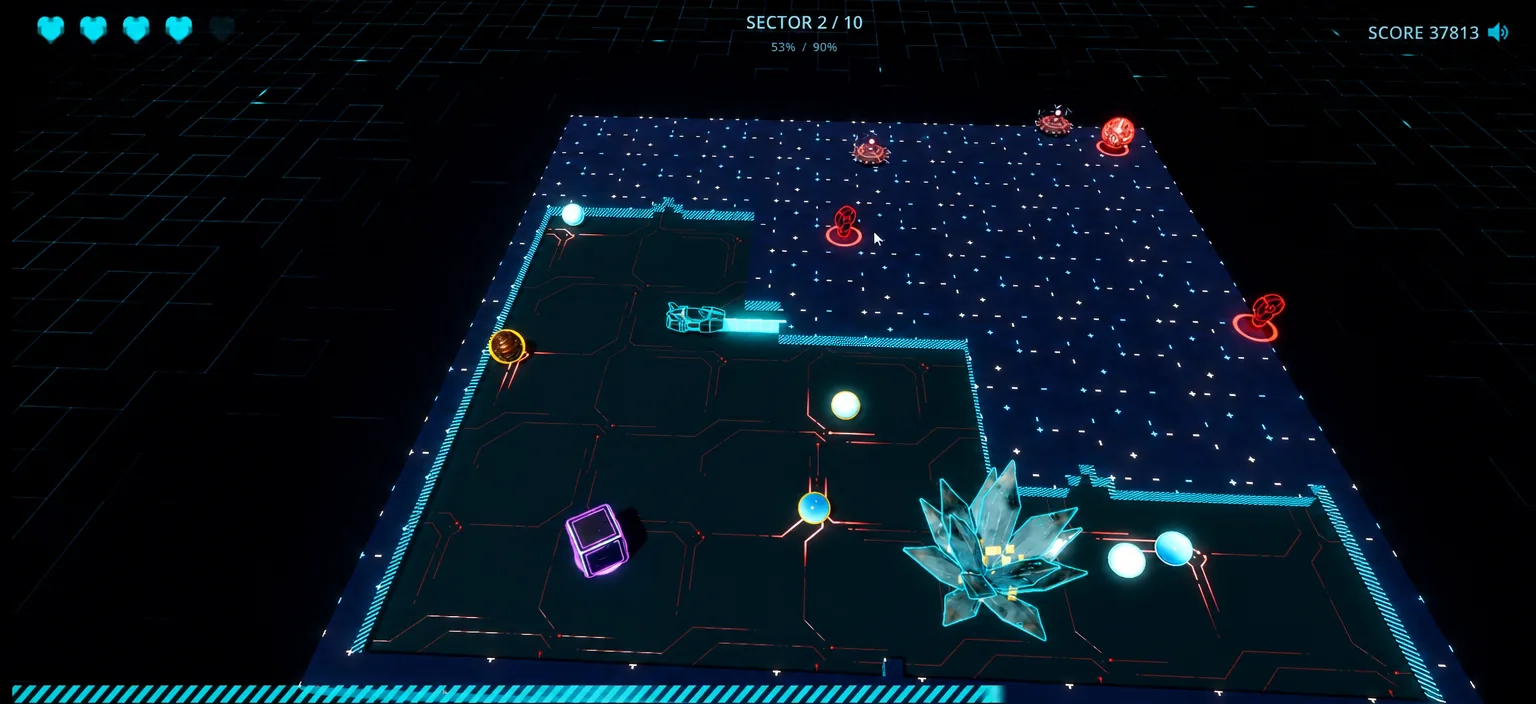
Tools used in this article


This one started as an accident. A while back, Claude helped me put a name to a game I’d been chasing for years. I played it with my sister when we were about five, roughly 25 years ago. Seeing it again, the nostalgia hit harder than I expected. The concept is dead simple and it still hooks you, and I caught myself thinking: I want this thing back, in 3D.
The goal wasn’t content. I wanted to build something I’d enjoy playing and could hand to my friends and family. So I wired everything into one agent. Claude Code drove Godot MCP, Blender MCP, and fal.ai for images, 3D, sound effects, and the music, all in one chat. This is the full workflow: where it broke, where it worked better than I expected, and what it cost in tokens and credits.
CLAUDE.md I wrote while building it. That file is the part you want if you plan to repeat my setup. It walks the next agent through Godot MCP, Blender MCP, and the fal.ai generation pipeline, with the exact gotchas I hit along the way. Grab the repo, or download the CLAUDE.md on its own: github.com/witnesstodark/tron-exonix · Download CLAUDE.md ↓CLAUDE.md are linked above, so you can rebuild the exact setup.1. A childhood game, found by AI
The original is Xonix, a tiny arcade game where you carve territory out of a field while balls bounce around trying to catch your line before you seal it off. Claim enough of the board and you clear the level. That’s the whole loop, and it still holds up.
I didn’t want to just copy it. I spent time replaying it first: what made it good, what I could improve, what to keep. The plan was to change the style, sharpen the mechanics, and make something worth showing my sister and my friends. You don’t need to design every detail up front. A lot of the good ideas only show up once you’re playing your own prototype.

2. Why Godot (not Three.js, not Unreal)
The first real decision was the engine. Three.js felt too limiting for what I wanted. Unreal Engine was way too much engine for a game this small. Then I remembered Godot: lightweight, instant to launch, a tiny download, and a good fit for indie 2D and 3D games. A lot of you had been asking me to test it too, so this was the excuse.
3. Concept and the Tron look
Before any code, I locked the concept inside my agent workspace: research, mood, and a batch of style images to react to. I landed on a Tron: Legacy aesthetic, near-black surfaces, glowing cyan edges, that cold neon atmosphere. It’s a look I’ve loved since I was a teenager, and it maps perfectly onto a grid-capture game.
4. The entire setup, in basically one prompt
This is the part that surprised me most. I never opened Godot to set anything up. I told Claude to build a Godot game and find the best MCP for the job, and it did the whole Godot side itself. One prompt. The only thing it asked of me was to restart the session so the Godot MCP would load.
Blender MCP is just as light: one plugin installed inside Blender and activated once. Both Godot and Blender are free, so the only paid piece is the fal.ai generation. To make it repeatable, I bundled everything I learned into a CLAUDE.md with the knowledge about Godot MCP, Blender MCP, and the fal.ai MCP. Drop it into Claude Code (or Codex) and it walks the setup for you.
# The gist of the first prompt (no manual Godot setup):
"Build me a Godot game. Find and install the best Godot MCP,
 wire up Blender MCP and the fal.ai MCP, then tell me what to restart."

# Blender side: install the MCP add-on once, enable it, done.
# Everything after that happens through the agent.
5. The golden rule: build small, iterate in a loop
Ten years in game development taught me one thing that matters even more with an agent: start small, then improve, and keep improving. Don’t ask it to build everything at once. That’s how you get a pile of bugs and burn tokens fixing the wrong thing. My first prompt was just a simple playable prototype plus a first set of textures.

The loop that made this fun: it builds a block, it runs the game for me, I play it, I hit a hotkey and record voice feedback straight into Claude, it adjusts. While it cooks, I answer an email. Block by block, platform logic, then ball logic, then bonuses, I verify each piece before moving on, so nothing turns into a mess I have to untangle later.

6. Textures with PATINA, confirmed in Blender
For the surfaces I used PATINA on fal.ai, a model that makes seamless tiling textures and returns a full map set (albedo, normal, height, and more). Claude is good with Blender MCP: it generates the maps, wires them onto a material, and lets me confirm how it looks before anything goes into the game.

The workflow for almost every surface was the same: generate the map, confirm the material in Blender, push it into Godot. Once the flat version looked right I asked it to take the surfaces into the third dimension, and the Tron circuitry started to glow across the play field.

7. Assets, and where the AI needed a human
I had it generate every asset and collect them in a single assets.blend so I could review, tweak settings, and re-import as needed. The enemies are three balls, soft (harmless to platforms), hard (destroys territory), and evil (homes in on you), plus a surface mine. I also had it build emission maps for each asset: take the albedo, run it through Nano Banana, produce a matching glow map. That part worked almost flawlessly.

It wasn’t all hands-off. When I asked it to generate five small props and split them into separate meshes in one shot, it failed. The fix was simple: I told it to just generate them, then I split them in Blender myself in about a minute and handed the named pieces back. Same with a softball whose shape came out wrong. I made a clean sphere in Blender and asked it to texture that instead. Knowing when to step in for 60 seconds saves a long back-and-forth.
8. The outline hack, then animation and VFX
A highlight outline is where a bit of knowledge beats a vague prompt. Instead of “add an outline”, I gave it the classic recipe:
Duplicate and scale the object
Copy the mesh and scale the copy up slightly so it sits just outside the original.
Invert the normals
Flip the duplicate’s normals so only its back faces render.
Add an emissive material
Give the inverted shell a glowing material. You get a clean outline that follows the shape exactly, and it’s cheap. Claude nailed it in a single prompt.
With the mechanics settled, the animation pass is what made it feel like a game. Pickup effects, crash particles, camera moves, fire trailing the balls as they cut through territory, an electricity effect on the surface mines: each one was a single plain-language prompt. I later added a chainsaw enemy that only moves along one axis, cuts through everything, and moves slower to balance it.

9. Sound and music, almost hands-off
The sound design surprised me most. All of it ran through fal.ai: ElevenLabs sound-effects for the SFX, and Stable Audio 2.5 text-to-audio for the music. I never touched a single piece of music. No editing, no cherry-picking. I just gave feedback (“this one fits, this one doesn’t”) and let it regenerate. It’s not a masterpiece, but it fits the vibe. A few effects took one or two iterations to land, nothing more.
10. What it actually cost
I tracked everything, because I assumed I’d drop at least $50 on assets alone. I was wrong. On the Claude side I noted my usage before and after, roughly 8% of the weekly limit on one model plus 12% on Fable 5, and both Claude and ChatGPT estimated that at around $6. For nearly seven hours of building, that’s almost nothing.

| Item | Tool | Cost |
|---|---|---|
| ~7 hrs of agent build (tokens) | Claude Code (Sonnet 5 + Fable 5) | ~$6 |
| 3D, images, textures, audio | fal.ai (PATINA, Nano Banana, ElevenLabs, Stable Audio) | $24.51 |
| Pre-tracking concept images | fal.ai | ~$10 |
| Total | Engine + Blender free | under $50 |
11. Live on the web, go play it
The next day I did some balancing (bumped it from 7 to 10 levels) and put it online. I expected the web export to be painful, since browser rendering and native rendering are different beasts, but Godot’s export to web mostly just worked. The only real snag was an environment map / SSR support gap, and a couple of prompts fixed it. Claude even set up an automatic deploy to the site and connected the leaderboard.

The demo from this guide is live on TOP 3D AI. Carve some territory, dodge the balls, and try to clear sector 10.
Launch ExonixWhat you actually get
That’s the whole project: a nostalgic idea turned into a deployed, playable 3D game in about a day, with one agent doing the heavy lifting and my own taste steering the parts that matter. New tools for building games and assets like this land constantly, and whenever they do, they go straight into the Arena so you can compare them before you commit.


