Stefan Vaskevich
Tools used in this article


Is GPT-6 Astra the best model for 3D work right now? Yes, hands down, and the quality jump is massive. But if you use it out of the box you might not even notice, because a chat window cannot see your scene, run your game or generate an asset. With the right set of tools and MCP servers it turns into real magic, and most of them are completely free. This is the exact setup I use: one agent and nine free tools, plus eight tests that show what it delivers in Blender, Unity, Godot, Unreal Engine 5.8 and Three.js.
This is a list, not a step-by-step lesson. Every entry has the link, what it does, how I install it, and why it earned a slot on my machine. The video walks through the tests; this page is the one place where all the links live.
Watch the tests and the setup
Every install, every prompt and every result, on YouTube.
The stack at a glance
Nine entries, all free to install. Tool counts are what Codex reports after /mcp on my machine; your numbers will move with each release.
| Tool | Type | What it adds | Size |
|---|---|---|---|
| Codex CLI | Agent | The terminal agent that runs GPT-6 Astra and hosts every MCP server below. | base layer |
| Higgsfield Blender plugin | Add-on + MCP | Controls Blender through MCP and generates 3D models, images and video into the scene. | control + generation |
| Blender MCP (official) | MCP | Blender Foundation's own server over the Python API. Runs happily next to Higgsfield. | 26 tools |
| Higgsfield CLI | CLI + skills | Image and video generation from the terminal, 30+ models, no API keys to manage. | 9 skills |
| Unity MCP (AnkleBreaker) | MCP | The most complete Unity server: scenes, physics, terrain, profiling, builds. Free and open source. | 330+ tools, ~80 exposed |
| Godot MCP | MCP | Launch the editor, run the project, read its console, manage scenes and nodes. | 14 tools |
| VibeUE (UE 5.8 branch) | MCP + skills | Extends Unreal Engine 5.8's native MCP with landscape, Niagara, UMG, audio, profiling. | ~36 skill packs |
| img2threejs | Skill | One reference image in, an interactive procedural Three.js model out. No mesh files. | 8-stage pipeline |
| fal.ai MCP | MCP | The widest model range: image, video, music, sound. You pick the model, it runs it. | 11 tools in Codex |
1. Codex CLI: the base layer
My first recommendation is to install and use Codex CLI instead of the ChatGPT desktop app or the Codex desktop app. It looks like the harder option. It is the opposite: once it runs in a folder, adding any MCP server or skill becomes the easiest task there is.
Install it, then open a terminal in any folder
The install is one line from the docs page, and you can ask ChatGPT to guide you through it. What you end up with: create a folder, type cmd into the Explorer address bar (or navigate there in PowerShell), and run codex. Slash commands give you everything from there. Set the model to gpt-6-astra and the reasoning effort to xhigh; that pair is what every test below ran on.
curl -fsSL https://chatgpt.com/codex/install.sh | sh
cd <your-project-folder>
codex --dangerously-bypass-approvals-and-sandbox   # "YOLO mode", see below
The main reason I like it: the bypass flag runs the agent without asking for approval on every step, and it just cooks. I have not hit a problem with it so far; if anything, GPT-6 asks too many questions about not spending extra credits. Keep it to a folder you can afford to break, and keep your real projects elsewhere.
Install MCP servers by dropping a link into the session
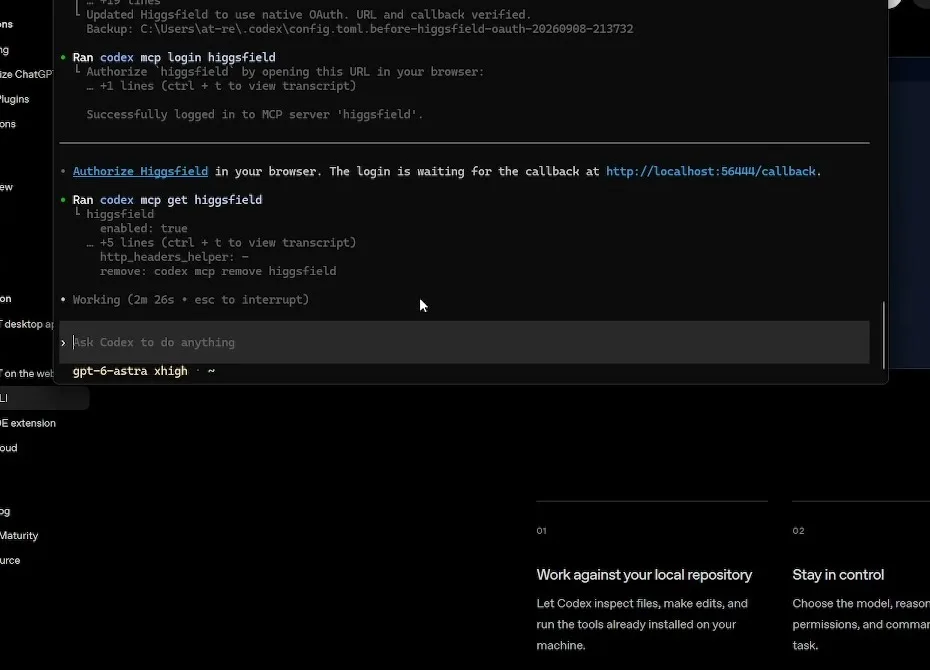
This is what the CLI gives you: for every tool in this article, I paste the link into the Codex session and say “install this MCP in this folder.” The agent reads the README, writes the config, and connects. Most MCP settings live in one config file, and skills live in one skills folder. I keep an agent folder with notes on my workflow, always run agents from there, and always give them full access.
Type /mcp to see what is connected and how many tools each server exposes. If one shows failed, ask Codex why. It reads its own logs and the docs and fixed my Higgsfield connection without me opening a config file. For reference, the manual form of every install is codex mcp add <name> -- <command>.
2. Blender: the Higgsfield plugin plus the official MCP
Blender is where I spend most of my time, and two tools cover it. The Higgsfield plugin on its own can be enough; it has far more functions than the native MCP. But you can run both, and my agent works with the pair nicely.
Higgsfield Blender plugin (and its MCP)
The Higgsfield Blender plugin is free. Credits are only used when you generate 3D models, images or video inside it. Install: download the zip, open Blender, Edit → Preferences → Add-ons → the small arrow button → Install from Disk, pick the zip, keep it zipped. Then enable it, and sign in when the login button appears; it sends you to the website to authorize and that is it.
What it gives your agent is an MCP with plenty of tools to control Blender, plus access to 3D model generation, image generation and video generation, all from the same session. Yes, generation consumes credits. But I do not know a free way to get 3D generation into an agent, GPT-6 on its own only generates images, and I prefer to have a choice: there is a model in there for stylized game textures that GPT-6 reached for on its own during the Unity tests.
Official Blender MCP (Blender Lab)
The Blender Lab MCP server is the Blender Foundation’s own bridge to the Python API, with documentation lookup built in. Blender 5.1 or newer. Drag the install link from that page into Blender twice (once for the Blender Lab repository, once for the add-on), and check that the server is actually running in the sidebar: sometimes it stops. It listens on port 9876 and shows up in Codex as 26 tools.
codex mcp add blender \
  --env BLENDER_MCP_HOST=localhost --env BLENDER_MCP_PORT=9876 \
-- uvx --from 'git+https://projects.blender.org/lab/blender_mcp.git@v1.0.0#subdirectory=mcp' blender-mcpHiggsfield CLI, for generation outside Blender
The Higgsfield CLI is the same account from the terminal: 30+ models for images up to 4K and video up to 15 seconds, consistent characters through Soul, and no API keys because you sign in once. Three commands, and the skills repo adds nine agent skills on top (generation, product shots, thumbnails, explainer videos, browser games). In the Unity tests every generated model came through this CLI.
npm i -g @higgsfield/cli
higgsfield auth login
npx skills add higgsfield-ai/skills3. Game engines: Unity, Godot and Unreal Engine 5.8
Each engine has several MCP servers by now. These are the three I kept, one per engine, all free and open source.
Unity: AnkleBreaker Unity MCP Server
The AnkleBreaker Unity MCP Server was built by one of the people from my community, and they put a lot of effort into it: 330+ tools across 30+ categories (scenes, GameObjects, components, physics, terrain, NavMesh, particles, UI, profiling, builds, even Unity Hub). About 70 core tools are always exposed and the rest load lazily through a proxy, which is why Codex reports around 80 instead of 330. It does not freeze the editor while the agent works. It is one of the best, most efficient MCPs I have tested, and it beats some paid ones.
Install, quickly: create a new Unity project (leave the built-in AI options unchecked, they did not work well for me), open Window → Package Manager → the plus button → Install package from git URL, paste the plugin URL from the README, Install. No restart needed. Then copy the README’s setup instructions into your Codex session and it figures out the rest and connects to Unity. Requirements: Node.js 18+, Unity 2021.3 LTS or newer including Unity 6.
Why it matters: with this server GPT-6 goes back and forth with the editor, runs the game, writes tests and plays it. I tested the same loop with Fable 5.1 before; GPT-6 is on another level here.
Godot: Coding-Solo Godot MCP
Godot MCP is the easiest possible thing and very efficient. Send the link to GPT-6 and ask it to install. The funny part: it does not even need Godot to start building a Godot project; you need Godot only to open the result in the editor. Fourteen tools in Codex (launch the editor, run and stop the project, capture debug output, create scenes, add nodes, load sprites, export MeshLibrary resources, manage UIDs on Godot 4.4+), MIT license, Node 18+. I used it for the childhood-game rebuild earlier this year.
codex mcp add godot -- npx @coding-solo/godot-mcp
# optional: --env GODOT_PATH=<path to the Godot executable>Unreal Engine 5.8: VibeUE, 5-8 branch
My choice is still VibeUE. It works together with the native MCP server that shipped in Unreal Engine 5.8, probably the best combo right now, and extends it where the stock toolset stops: landscape and foliage, real-world terrain from GPS, MetaSound and SoundCue graphs, animation assets, Niagara emitters with custom HLSL, UMG widgets with MVVM bindings, Blueprints, behavior trees, undo-safe transactions and profiling with Unreal Insights traces. It registers about 36 skill packs so the agent knows which tool to reach for.
On Unreal Engine 5.7 or lower, stick with VibeUE alone; it is the best free, open-source option I have tested. It asks for a registration, but it stays free. Three steps: enable the engine’s native MCP plugins (Unreal MCP, Toolset Registry, Editor Tools), clone VibeUE into Plugins/ and run the build script, then generate the client config from the editor console; Codex is one of the clients it generates for. The UE 5.8 native MCP article covers the engine side.
4. Web and generation: img2threejs and fal.ai
img2threejs: a photo becomes an interactive Three.js model
If you spend time on X you have seen the examples. img2threejs is a skill, not a server: give it one reference image and it rebuilds the object as procedural Three.js in TypeScript, primitives and generated geometry and shaders, no mesh files, animation-ready. It runs a staged pipeline (blockout, structural, form, material, surface, lighting, interaction, optimization) where scripts gate each stage and the model only spends tokens on visual judgment. Python 3.10+ with the standard library only, Apache 2.0, and it supports Codex next to Claude Code and OpenCode.
Installing it from the CLI is ridiculously simple: copy the repo link, drop it into your session, say “install the skill.” My test was a vintage Underwood typewriter that had to be actionable: click the keys in 3D and it prints on the paper. The shape is not 100% accurate and the side keys are a bit off, but it looks decent and it works: I can type on it. The right approach with this skill is one step at a time: do the shape, then the keys, then add this and this, and navigate it manually. You will get far.
fal.ai MCP: the widest model range, if you know what you need
One more general recommendation: if you want to give your agent access to plenty of APIs, consider the fal.ai MCP server. It needs a fal.ai API key and gives probably the widest range of models: music, sound, video, images and more, across fal’s 600+ endpoints, with model discovery and pricing lookups built in. Eleven tools in Codex, MIT license, Python package or Docker.
The trade-off: unlike the Higgsfield MCP, it does not expose the models in a nice, ready-to-use way. You have to guide the agent on which exact model to use for which purpose, and that takes longer. If you have set it up once and you know which models you need, it is a good option. My Claude + Blender setup leans on it for the same reason.
pip install fal-mcp
codex mcp add fal-ai --env FAL_KEY=<your_fal_key> -- fal-mcp
5. Eight tests that prove it
Every test is one written brief with a hard rule (which engine, which tools, what stays on screen), a list of what gets measured, and a protocol: an iterative session with my feedback, or one frozen brief where the agent has to build, inspect, repair and verify on its own.
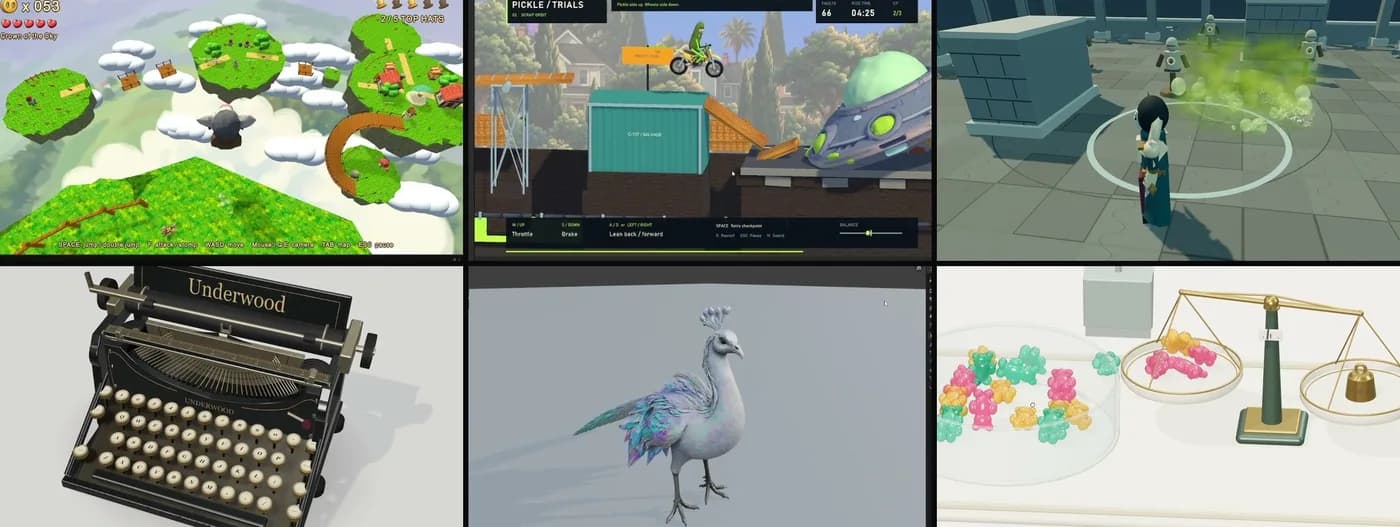
Mr Mak 64 is the one to look at first. I challenged GPT-6 to recreate the game of my childhood, Super Mario 64, with my own hero Mr Mak instead: an N64-style third-person platformer on floating sky islands, five earnable hats, one hundred buttons, enemies that punish you, a findable secret. I have been testing game creation with AI for a while, and this is the best result so far, especially how well it understands space. Not perfect (the run animation’s weights are a little broken), but the trend is what matters. 277 model requests, two and a half hours, 30 million tokens.
Pickle Trials is the bike trials game I played as a kid, in a cartoon sci-fi wrapper, with the same setup and unlimited access to asset generation. The funny thing I learned: GPT-6 cares about my money. It generated fewer assets than it could have and built procedural stuff instead, so one of my seven or eight follow-up prompts (you can keep prompting in the CLI while the main task runs, and play the build while it is still cooking) was literally “generate more images and 3D assets.” It also rigged the pickle to the bike in a Blender file on its own. Two hours, 17 million tokens, and when it said it was done I did not report a single bug. It had played the game itself first.
Spell Arena came from a post on X where someone tested VFX with GPT-6, and I had to try it. Pure Three.js, no assets, everything procedural, and the whole point is the VFX: spells that cast along a line, a procedural black hole that distorts the view and crushes the target (a complicated shader), a flame, a storm. It did not just make the effects; it gave me a control panel for each one, colors, timings, texture sizes, so it works like a game development tool: tweak until you like it, then bring it into your game. Frozen brief, MAX reasoning, 648 real-browser checks passed and 101 more on the final build, p95 frame time 11.1 ms at 1080p.
Gummy Balance was inspired by the jelly experiments people were posting in Three.js. One brief: a confectionery counter, 24 translucent gummy bears at 10 g each, a mechanical balance and a scoop, grab or scoop them and match the 100 g reference. The physics works (real load on both pans, five pours verified), the bears could be more jelly, and with more time balancing it, it would be. That one was the longest run, 3 h 12 m and 18.9 million tokens, because it continued from an earlier candy-tray snapshot. Vinyl Shop closes the list: a retro-anime record shop rebuilt in Blender 5.2 from a single 2752 x 1536 reference image, as editable geometry (1,773 objects, 108 record sleeves, a working player), plus a 12-second assembly animation and a 9-second playback loop, in 1 h 40 m and 11.2 million tokens. Four months ago I ran the same kind of test with Opus 4.8 and GPT-5.6, and they could not place objects with the right rotation. Now it builds the scene accurate in camera perspective, and its own report admits the match is not pixel perfect.
What it costs and how long it takes
The pattern across all eight tests is the same. The model was never the bottleneck; the tools were. Give GPT-6 Astra eyes and hands in the application you actually work in, write a brief with a measurable finish line, and it delivers. Take the tools away and you are back to pasting scripts. And yes, for now I have switched from Claude to GPT for this work; at these weekly-limit numbers it is hard to argue with.
Related setups on this site: the Claude + Blender setup, Kimi K3 building ten Unity games, the native UE 5.8 MCP, and the Higgsfield character-sheet skill.